
Ren_ParticleMaster for RedM
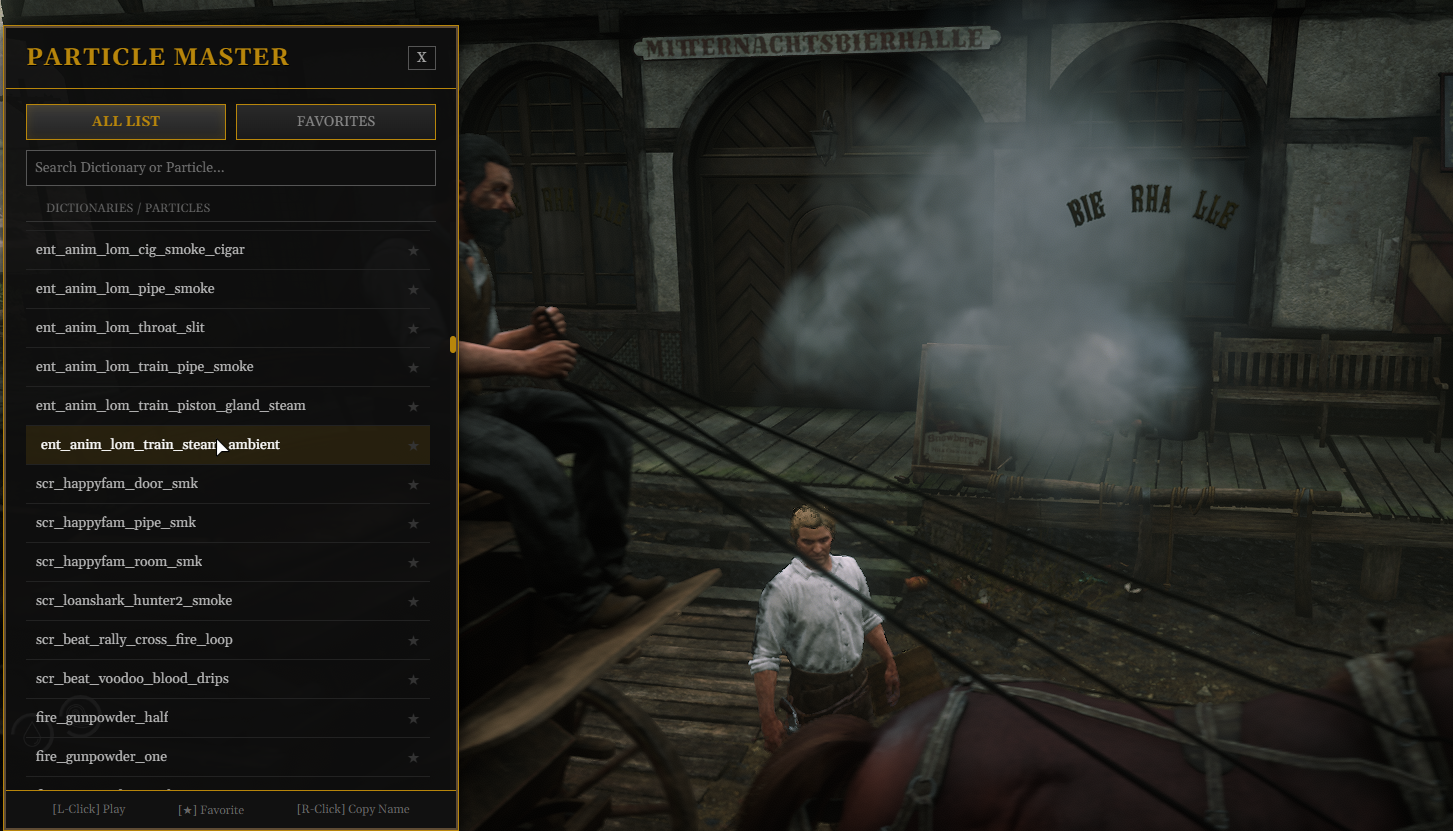
This is an ultra-lightweight, high-performance particle (effect) viewer optimized for RedM servers.
Designed to minimize server load to the absolute limit, it's ideal for developers and server administrators to verify effects.
📌 Features
Ultra-lightweight: All search and list display processing is handled on the JavaScript side, resulting in nearly zero load on Lua (server/client). Assets are loaded only during playback.
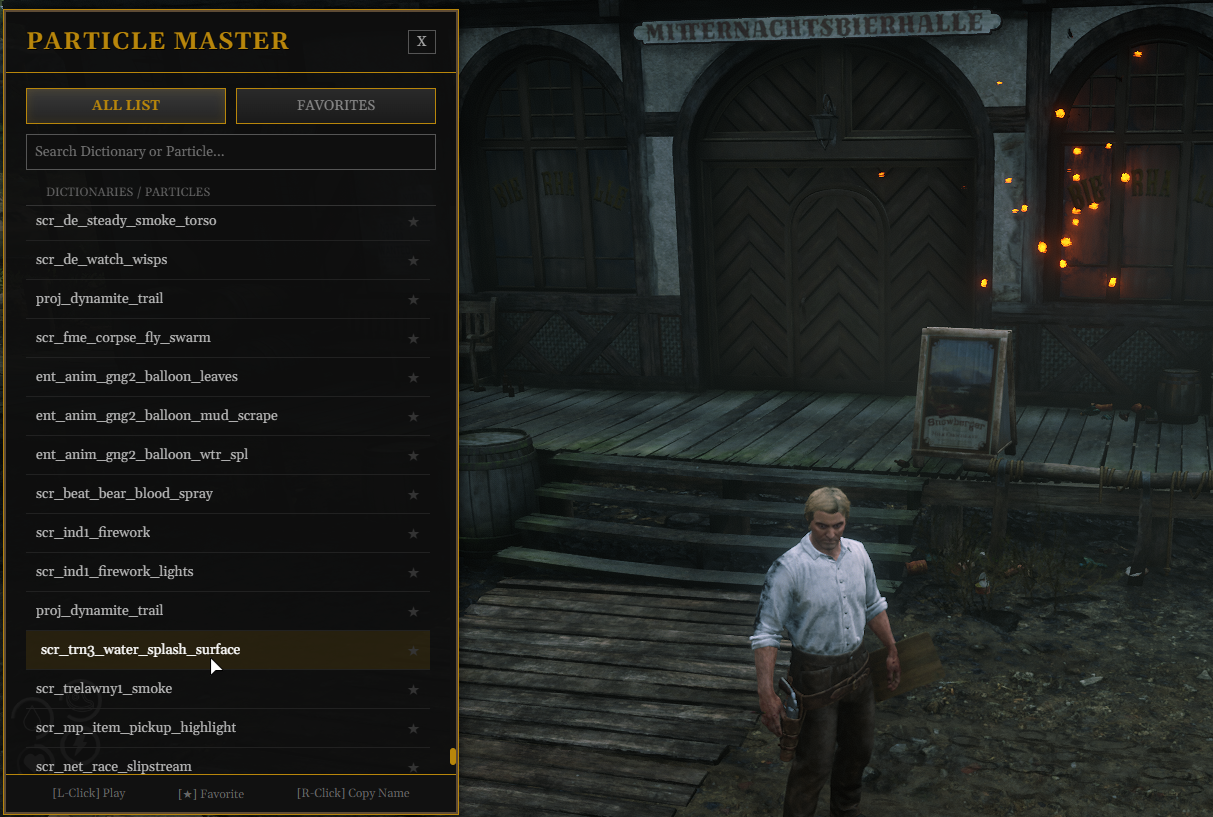
RDR2-inspired UI: A dark & gold design reminiscent of “Animation Master” that preserves the game's aesthetic.
Smart Playback:
Effects play directly in front of the player (at eye level).
Hybrid playback logic supports both “One-shot” and “Looped” modes (looped effects auto-stop after 5 seconds).
Search Function: Filter by dictionary name or particle name in real-time.
Favorites Function: Save frequently used effects to the browser's local storage.
Development Copy Function: Right-click a list item to copy it to the clipboard in a format ready for immediate use in Lua scripts.
📥 Installation
Place the Ren_ParticleMaster folder in the resources directory.
Add the following to server.cfg:
Cfg
ensure Ren_ParticleMaster
🎮 Usage
Command
Enter the following command in-game to open the menu:
/rptv
\
Controls
Left-click: Plays the particle.
Right-click: Copies the Lua code format to the clipboard.
Copy Format:
particleDict = “scr_dict_name”,
particleName = “scr_particle_name”,
★ Icon: Add/Remove from Favorites (Viewable in the FAVORITES tab).
Search Bar: Enter text to instantly filter the list.
\
⚙️ Adding Particles
Particle data is stored in html/particles.js.
To add a new particle, edit this file.
html/particles.js format:
const particleData = {
“Dictionary Name”: [
“Particle Name 1”,
“Particle Name 2”
],
“scr_net_player_signal”: [
“scr_net_player_signal”
],
// ... Add more below
};
\
🛠️ Integration into Admin Menu (Developer Integration)
Exports are provided to open/close this viewer from other scripts (like Ren_adminmenu).
Client-side
-- Toggle menu display
exports.Ren_ParticleMaster:ToggleMenu()
Example: When adding to Admin Menu button handling
RegisterNUICallback(“openParticleViewer”, function(data, cb)
exports.Ren_ParticleMaster:ToggleMenu()
cb(‘ok’)
end)
\
⚠️ Important Notes
This resource operates standalone (no framework dependency).
If particles are not visible, the effect itself may be extremely small or transparent and only visible under specific conditions.
📜 License
Created by Ren.
RedM Community Resource.
-----------------------------------------------------------------------------------------
RedMサーバー向けに最適化された、超軽量・高機能なパーティクル(エフェクト)ビュワーです。
サーバー負荷を極限まで抑える設計になっており、開発者やサーバー管理者がエフェクトを確認するのに最適です。

(ここにスクリーンショットを貼ると分かりやすいです)
📌 特徴 (Features)
極限の軽量化: 検索やリスト表示処理をすべてJavaScript側で行うため、Lua(サーバー/クライアント)の負荷はほぼゼロです。再生時のみアセットをロードします。
RDR2風 UI: ゲームの世界観を崩さない「Animation Master」風のダーク&ゴールドデザイン。
スマート再生:
プレイヤーの目の前(目線の高さ)で再生されます。
「単発(One-shot)」と「ループ(Looped)」の両方に対応するハイブリッド再生ロジックを搭載(ループ系は5秒後に自動停止)。
検索機能: 辞書名やパーティクル名をリアルタイムでフィルタリング。
お気に入り機能: よく使うエフェクトをブラウザのローカルストレージに保存。
開発用コピー機能: リストを右クリックすると、Luaスクリプトですぐに使える形式でクリップボードにコピーされます。
📥 インストール (Installation)
Ren_ParticleMaster フォルダを resources ディレクトリに配置します。
server.cfg に以下を追記します。
Cfg
ensure Ren_ParticleMaster
🎮 使用方法 (Usage)
コマンド
ゲーム内で以下のコマンドを入力してメニューを開きます。
/rptv
\
操作
左クリック: パーティクルを再生します。
右クリック: Luaコード形式でクリップボードにコピーします。
コピー形式:
particleDict = "scr_dict_name",
particleName = "scr_particle_name",
★アイコン: お気に入り登録/解除(FAVORITESタブで確認可能)。
検索バー: 文字を入力すると即座にリストが絞り込まれます。
\
⚙️ パーティクルリストの追加 (Adding Particles)
パーティクルのデータは html/particles.js に格納されています。
新しいパーティクルを追加したい場合は、このファイルを編集してください。
html/particles.js 形式:
const particleData = {
"辞書名(Dictionary)": [
"パーティクル名1",
"パーティクル名2"
],
"scr_net_player_signal": [
"scr_net_player_signal"
],
// ... 以下追記
};
\
🛠️ Admin Menu への組み込み (Developer Integration)
他のスクリプト(Ren_adminmenuなど)からこのビュワーを開閉するための Export を用意しています。
クライアントサイド (Client-side)
-- メニューの表示/非表示を切り替え
exports.Ren_ParticleMaster:ToggleMenu()
例: Admin Menuのボタン処理に追加する場合
RegisterNUICallback("openParticleViewer", function(data, cb)
exports.Ren_ParticleMaster:ToggleMenu()
cb('ok')
end)
\
⚠️ 注意事項
このリソースはスタンドアロンで動作します(フレームワーク依存なし)。
パーティクルが表示されない場合、そのエフェクト自体が非常に小さいか、特定の条件下でのみ見える透明なものである可能性があります。
📜 License
Created by Ren.
RedM Community Resource.